RobPen Photography
Special 25% discount on last remaining dates in 2026. Book early to claim your discount on bookings 2027 & 28, 29
RobPen Photography
Special 25% discount on last remaining dates in 2026. Book early to claim your discount on bookings 2027 & 28, 29
Wedding album plan page Album layout template
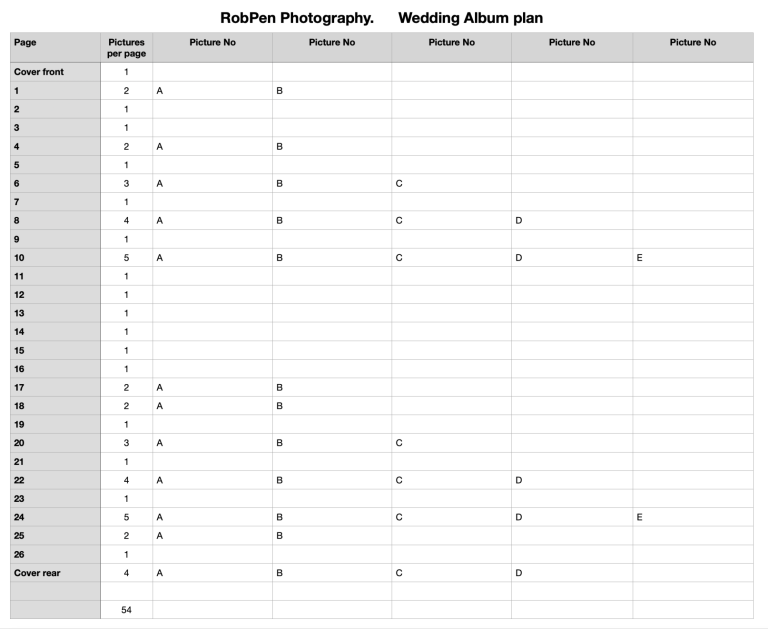
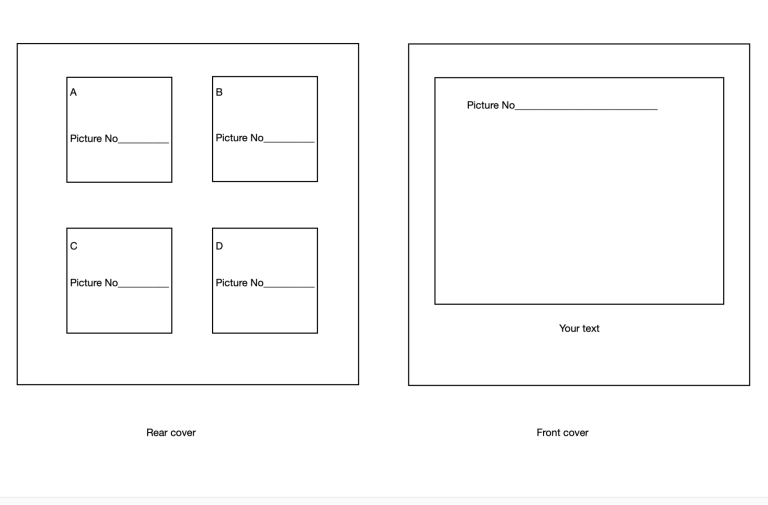
Step 1. Select up to 54 pictures from the usb stick you received from us. ( if you require less pictures or more please give us a call or if you wish to include a few pictures of your own thats no problem).
Step 2. Looking at the album layout template select a pictures for the front and rear pages and write the picture numbers in the boxes. (just the last four number. eg. if the number is OU7A0562.JPG just 0562 will be fine) You will also need to decide on text for the front cover.
Step 3. Select 2 pictures for page 1 and write the numbers in the appropriate boxes.
Step 4. Simply repeat for all 26 pages.
Step 5. Copy the numbers from the layout template booklet and enter them on the Wedding album plan page, then send to us. We will contact you to run through the details and then get the album printed. You should receive the album approximately 21 days later.
Step 6. Simply give us a call 07709-921009 to run through the details, then we can proceed with the printing.
We need your consent to load the translations
We use a third-party service to translate the website content that may collect data about your activity. Please review the details in the privacy policy and accept the service to view the translations.